Merge IM, email and social network accounts under one interface

Let's face it: most of us have more online accounts than we can control. Email addresses, instant messaging clients, social networking sites… do you really have time to catch up with all of them?

Top Recommended Alternative

If you don't, then you need Digsby, a revolutionary all-in-one IM client with which you can handle all your online contacts under the same interface, even if they belong to different networks. OK, this is probably not that revolutionary, but the real surprise comes when you realize you can also add your email accounts, no matter if they're online or POP3 based, and also your personal profiles in Facebook and MySpace. The result is that Digsby enables you to control pretty much every aspect of your online social life in a very easy way.

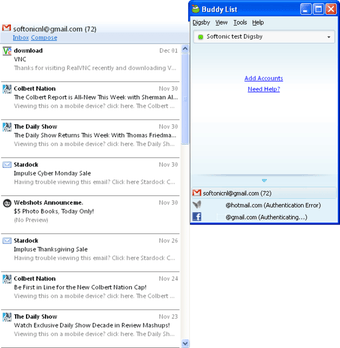
After installing the program, you can start adding as many accounts as you want in order to handle them from Digsby. This includes AIM, MSN, Yahoo!, Google Talk, ICQ, Gmail, Yahoo! Mail, Hotmail, Facebook, MySpace and more. Despite the amount of supported services, they're presented in a very clear, uncluttered interface and organized in tabs. You'll be able to chat with your buddies via IM and also check and organize your email without even having to open your browser. Everything worked fine except for Facebook, which kept on showing a "Connecting…" message though the widget was up and working on my Facebook profile. My ICQ account didn't seem to respond either, but I guess it's got something to do with the fact that Digsby is still in beta stage.

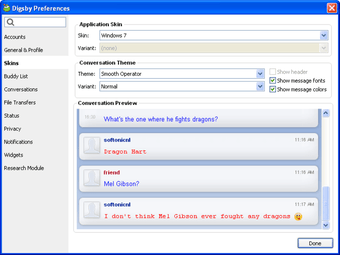
Digsby saves chat history, supports file transfer and features an extended settings menu from which you can tweak the program's appearance and performance. The only drawback I found, besides the Facebook connectivity issue, was the lack of speed when starting the program and logging in. But then again, it's well worth it.

With Digsby you'll be able to manage all your online accounts for email, IM and social networks under a single interface, making it much easier and faster for you to stay in touch with your friends.

Changes

Auto-Update System: We have a brand new auto-update system in Digsby. Accounts Section: We redesigned the Accounts section in Preferences from the ground up to reflect Services you use with features that you can enable and disable for each service. Email/Social Panels: The email and social network panels on the buddy list got a makeover. Sorting/Grouping: We changed how grouping and sorting options work in “Preferences > Buddy List”. RTL Support: We added RTL support to all of the IM window conversation themes. ICQ Spam Blocker: We added an option in the Privacy settings for ICQ accounts to automatically block friend requests with URLs in them. Stability: We fixed several memory leaks related to account disconnects along with several of the most common crash causing bugs to improve Digsby stability and performance.


  • Pros

    • Control IM, email and social network accounts from one single interface
    • Support for the most popular online services
    • Clear, organized interface
    • Very complete settings menu
  • Cons

    • A bit slow when logging in
    • Facebook doesn't work properly with Digsby
 0/3

App specs

  • License

    Free

  • Version

    build-92
  • Latest update

  • Platform

    Windows

  • OS

    Windows 10

  • Language

    English

    Available languages

    • German
    • English
    • Spanish
    • French
    • Italian
    • Japanese
    • Polish
    • Chinese
  • Downloads

    64.2K

    Last month's downloads

    • 6
  • Size

    19.15 MB

  • Developer

Program available in other languages


Icon of program: Digsby

Digsby for PC

  • Free
  • 4
    142
  • 64.2K
  • Vbuild-92

User reviews about Digsby

4

3 reviews

Add review

Main reviews for you

  • Anonymous user

    Experiencing problems connecting with all of my email accounts using Digsby. I am new to digsby so I don't have a great deal of experience with them to comment on yet. But I have been having problems connecting to my outlook accounts. While researching this I did find that one other person was very frustrated with their lack of desire to fix this problem and after 9 months gave up with them. I hope that they can get this glitch taken care of to make their service all they claim it to be.

  • Anonymous user

    4 out of 5. As I used this one is good. But, if this package contains Skype as well, then no need to go for any other applications. Pros: AIO Cons: Skype is missing in the bundle

  • Anonymous user

    The best multiprotocol messanger I've ever have. I switched to Digsby a couple of weeks ago. I can say only good about it. It is powerful like Miranda but much more user friendly. Pros: Great look, easy to use and configure Cons: Ad banner must be switched off manually in Options (go to Options/Conversations and uncheck the first box in 'Ad Options').

More

You may also like

Alternatives to Digsby

Explore Apps

Related Articles

Latest articles

Laws concerning the use of this software vary from country to country. We do not encourage or condone the use of this program if it is in violation of these laws.
Softonic

Is Digsby safe?

98/100

Score result: Clean

This file passed a comprehensive security scan using VirusTotal technology. It is safe to download.

  • Virus free
  • Spyware free
  • Malware free
  • Verified by Security Partners

    VirusTotal logo

Scan Info

Last scan
Saturday, January 6, 2024
Scan provider
VirusTotal · Full report

File Integrity

File
digsby_setup.exe
SHA256
7381d7bc8b6969136c53fbfcfc63e1d5f209183c3cec7464baae3e297f4bcbe6
SHA1
a4f75a97f957ac479833baf349f56c5b156ef09f

Softonic security commitment

Digsby has been thoroughly scanned by our advanced security systems and verified by industry-leading partners. This file comes from the official developer and has passed all our security checks, showing no signs of viruses, malware, or spyware. For more information, visit our Security and Trust Center